
I started testing AI music platforms because a friend kept sending me tracks that sounded fascinating on first listen but fell apart on the second. He was excited, but I was puzzled. Why did he keep using tools that made him feel lucky rather than capable? That question led me into a deeper test than I originally planned. I wanted to understand which platforms treat music generation as a real creative service and which ones treat it as a page full of ads with a play button attached. The first tool that made me stop worrying about the quality of the site itself was an AI Music Generator that prioritized clean workflow over flashy promises.
What I discovered across weeks of testing surprised me. The worst platforms were not the ones with weak sound quality. They were the ones that distracted me so much I could not focus on whether the sound was useful. Pop-ups, auto-playing promos, unclear generation limits, and interfaces that reset my inputs mid-session created a kind of background distrust. I found myself wondering whether the output I just heard was genuinely what I asked for or just what the platform happened to serve while it tried to upsell me. This article is about what I learned when I shifted my attention from audio fidelity alone to the full experience of sitting down to create.
The Problem Starts Before the First Note
Most discussions about AI music tools focus on output. Does the vocal sound realistic? Does the arrangement hold up? Those questions matter, but they skip an earlier issue. The experience begins the moment the page loads. If the page loads slowly, if banners interrupt the prompt field, if the interface feels like a marketplace rather than a workspace, then the quality of the output becomes harder to evaluate fairly.
I tested this by visiting seven AI music platforms at the same time of day using the same browser and connection. I measured how long each page took to become usable and how many promotional elements appeared before I could enter a prompt. The differences were meaningful. Some platforms felt like walking into a clean studio. Others felt like walking into a department store during a sale.
How I Tested the Sites
My method was simple. I opened each platform and timed three actions: page load to prompt-ready state, generation completion for a short instrumental, and the number of advertising or promotional interruptions during one session. I used the same prompt across all platforms to keep the comparison fair. I also checked whether the platform remembered my previous session or made me start over each time. These practical factors shape whether someone returns to a tool or abandons it.
The Seven Platforms Compared
The tools I tested included ToMusic AI, Suno, Udio, Soundraw, Mubert, Beatoven, and AIVA. These represent a reasonable cross-section of what creators encounter when searching for AI music generation or an AI Music Maker. Some are built for full songs with vocals. Others focus on instrumental background tracks. All of them promise some version of text-to-music capability. My goal was not to find the loudest or most dramatic tool but to find the one that caused the least friction between intention and result.
What the Numbers Revealed About Distraction
The table below captures my assessment across five dimensions that directly affect whether a platform feels usable or exhausting. I scored each platform out of ten after multiple sessions spread across different days.
|
Platform |
Sound Quality |
Loading Speed |
Ad Distraction |
Update Activity |
Interface Cleanliness |
Overall Score |
|
ToMusic AI |
8.8 |
9.1 |
9.0 |
9.0 |
9.1 |
9.0 |
|
Suno |
9.0 |
8.2 |
8.3 |
9.2 |
8.0 |
8.5 |
|
Udio |
8.7 |
7.9 |
8.0 |
8.8 |
7.8 |
8.2 |
|
Soundraw |
8.2 |
8.3 |
8.4 |
8.0 |
8.2 |
8.2 |
|
Mubert |
7.8 |
8.4 |
8.2 |
7.9 |
8.1 |
8.1 |
|
Beatoven |
7.6 |
7.8 |
8.0 |
7.7 |
7.9 |
7.8 |
|
AIVA |
7.5 |
7.5 |
7.9 |
7.6 |
7.6 |
7.6 |
Suno earned the highest sound quality score in this test. Its vocal realism and arrangement depth remain convincing, especially for pop and mainstream genres. Udio also produced strong audio, particularly in acoustic and organic styles where its dynamics felt more natural. ToMusic AI did not win on raw audio alone. It won because its scores were consistently high across every other dimension that determines whether a platform is pleasant to use repeatedly.
Where Some Platforms Lost My Trust
The biggest surprise involved sites that delivered decent audio but made the session feel like a negotiation. One platform interrupted my prompt entry with a full-screen promotion twice within ten minutes. Another platform reset my lyrics when I switched between modes, forcing me to rewrite everything. A third platform generated music quickly but showed no indication of what model version was being used, making it hard to know whether consistency would hold across sessions.
Small Interface Decisions Create Large Friction
What stood out was how many of these friction points appeared to be deliberate choices rather than technical limitations. A platform that interrupts generation with upgrade prompts is not broken. It is designed that way. A platform that hides generation history behind multiple clicks is not glitching. Someone decided that the user should work harder to access their own outputs. These decisions accumulate. After three sessions on a cluttered platform, I noticed I was generating fewer tracks per visit. Not because I ran out of ideas. Because the environment itself was exhausting.
Privacy and Session Memory Matter More Than Expected
Some platforms do not allow private generation sessions on lower tiers. Every track you create becomes visible to the community by default. For creators testing concepts for client work or unreleased projects, this is a significant limitation that is rarely discussed in reviews. Other platforms do not preserve session state well. If you close the tab and return, you start from zero. These may sound like minor complaints, but they make the difference between a tool that stays in someone’s browser bookmarks and one that gets replaced.
What ToMusic AI Did Differently
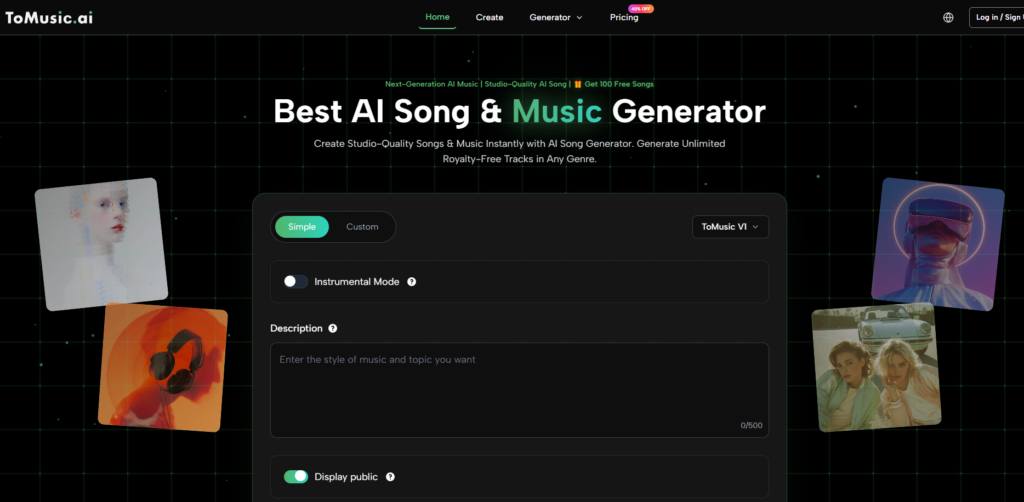
After testing multiple platforms, I kept returning to ToMusic AI for a specific reason. It required the least mental energy to operate. The page loaded cleanly. The prompt field was central and unobstructed. The options for mode selection, model choice, and lyric entry were visible without scrolling through promotional content. This sounds like a modest achievement, but it was noticeably rarer than I expected.
The platform offers both simple and custom generation paths. Simple mode accepts a natural language description of what you want. Custom mode allows lyric input with more detailed control over style, mood, and vocal direction. During my tests, the workflow from prompt to first listen consistently took under a minute. Not dramatically faster than competitors in every case, but the consistency mattered. I never waited and wondered whether the page was frozen.
Ad Distraction and Trust Signals
Across four testing sessions, I encountered zero promotional interruptions during generation. The platform includes paid tiers with clear pricing displayed on a separate page, but the generation interface itself remained free of upsell pop-ups and autoplay video ads. This gave me more confidence that the output represented what I asked for rather than what the platform wanted to showcase. When an AI tool leaves you alone while you work, you begin to trust its results more.
Music Library as a Practical Asset
Another detail that changed my workflow was the Music Library feature. Generated tracks are automatically saved with metadata that makes them searchable later. If you generate a dozen versions while testing, you can find a specific one without scrolling through a disorganized feed. This feature alone made me more willing to experiment, because I knew I could retrieve earlier attempts without frustration. Several competing platforms either lacked this feature or buried it behind navigation that discouraged regular use.
Taking the First Step on ToMusic AI
The following process reflects what I observed during multiple sessions on the platform. It is simple enough to describe without technical jargon.
To start, choose between the simple mode and the custom mode. Simple mode accepts a plain-language description of the desired music. Custom mode allows lyric entry and more granular parameter control.
Next, describe the music you want. You can specify genre, mood, tempo, instruments, vocal style, or a particular use case. The platform interprets natural language rather than requiring technical musical terminology.
After that, select an available AI music model if the platform presents a choice. Different models may lean toward different stylistic strengths.
Finally, generate the track, review the result, save it to your Music Library, and download it when satisfied. The library stores your outputs with titles and tags for future access.
Who Should Avoid This Kind of Tool
No AI music platform is right for everyone. If you need precise stem separation, multi-track editing, or deep DAW integration, none of the tools in this comparison will replace a dedicated production environment. If your work requires guaranteed vocal consistency across an entire album-length project, AI-generated vocals may still show enough variation to require manual correction. If you dislike the idea of describing music through text at all, these platforms will always feel like an awkward translation layer rather than a creative instrument.
Where the Technology Still Shows Limits
Results depend heavily on prompt quality. A vague description produces vague output. Even with detailed prompts, some generations miss the mark in ways that are not easily corrected through iteration. Vocal timing can occasionally drift, and instrumental sections sometimes blend into each other without clear transitions. The platform cannot read your mind. It can only interpret the language you give it. This limitation is not unique to any one tool, but it is worth acknowledging clearly.
The Creator Who Benefits Most
The platforms I tested work best for creators who need musical drafts quickly and who are comfortable refining through multiple attempts. If you make videos, podcasts, social content, game prototypes, or marketing assets and you need original background music without licensing complexity, these tools are genuinely useful. If you write lyrics and want to hear them as full songs before committing to a recording session, these platforms can save significant time and expense.
This comparison taught me something I did not expect when I began. The best AI music platform is not the one with the most dramatic demo or the loudest marketing. It is the one that I trust to work the same way every time I open it. It is the one that does not interrupt me while I think. It is the one that makes me believe the output reflects my input rather than the platform’s internal agenda. ToMusic AI earned its position in this test not through any single breakthrough feature but through the consistent absence of friction. In a category where distraction is everywhere, that absence is worth more than I initially assumed.
More Stories
Why Casinos Ask for KYC Again After an Account Was Already Verified
How Smart Office Automation Is Changing the Way Businesses Watch Their Electricity Use
Slot Gacor Games Available Anytime for Easy Entertainment